

In today’s digital arena, videos are the go-to medium for storytelling, learning, and capturing moments. The vast ocean of video content holds a treasure of information waiting to be discovered. However, with the sheer volume, finding the specific video or a segment within a video that you need can often feel like searching for a needle in a haystack. But what if you could just ask for what you need in simple words or by showing a picture? In this article, we will show you how to build a video search app using Epsilla vector database and Streamlit.
Just Ask or Show, And You Shall Receive
With the example app, gone are the days of endless scrolling through video timelines or reading through countless video descriptions. Now, you can simply type in a natural language query or upload an image to dive into the precise video content you’re after. For instance, if you’re interested in homemade chicken recipes, just type in “homemade chicken” or upload a picture of a chicken dish. Voila! You’ll be presented with relevant videos and the exact moments within those videos where homemade chicken are being made.
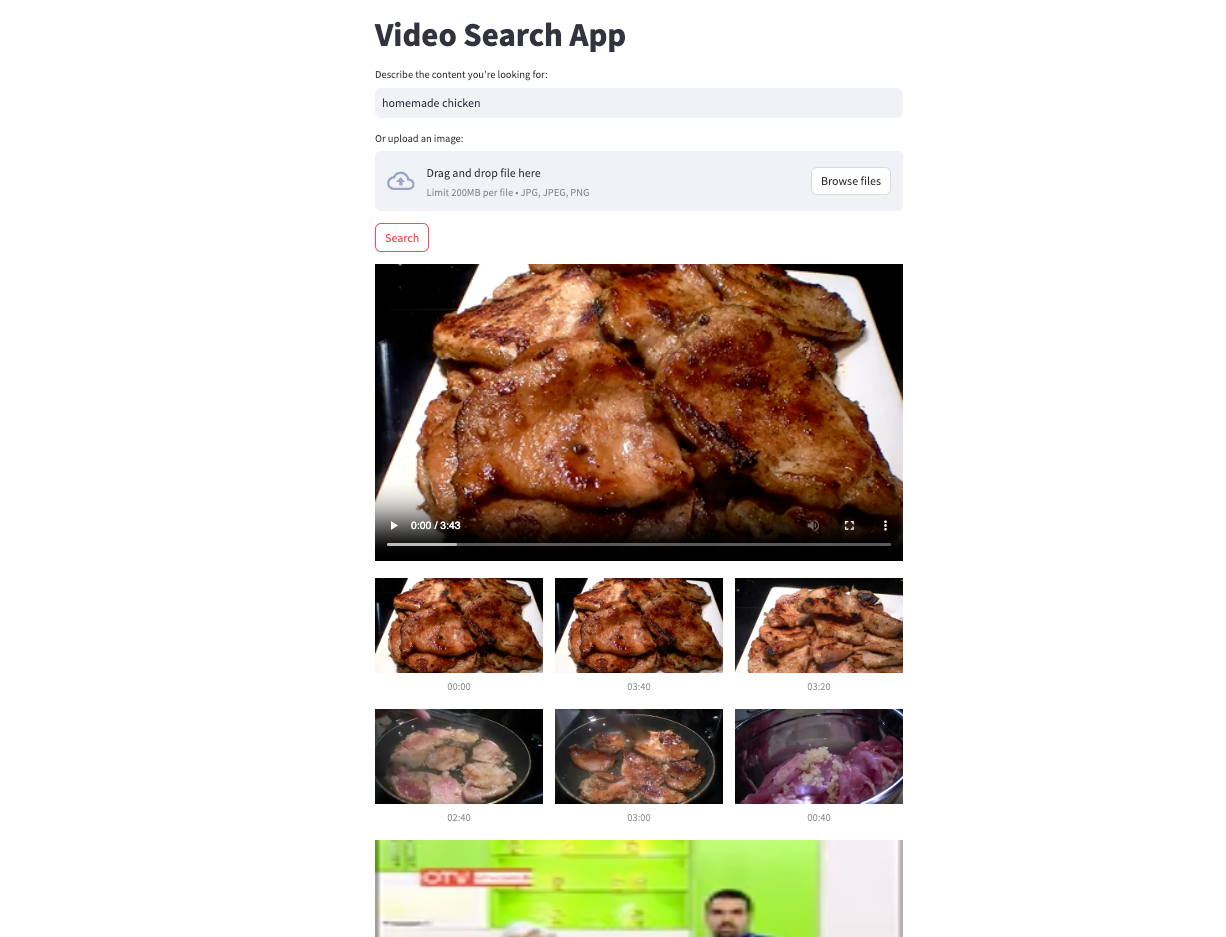
We can also try searching terms like “people running in a forest”, “fish tank inhabitants”, or try searching with images that includes “a high-speed railway” or “a person playing a guitar”.
More search examples using text or images
Now let’s demystify how to build such an app leveraging multi-modal semantic search powered by Epsilla vector database.
Embedding & Semantic Similarity Search
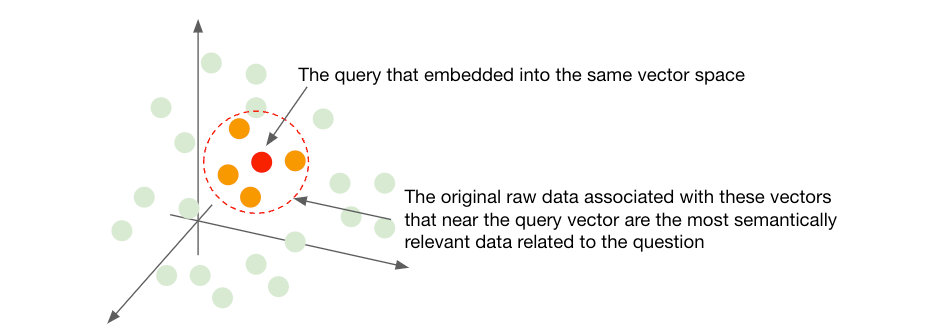
Embedding is a technique used in machine learning that converts unstructured data (text, image, video, audio) into a vector (a sequence of floating numbers), and retains the semantic meanings of the original data. This technique enables the preservation of relationships and structures from the original data in a format that can be more easily analyzed or processed by machine.

The beauty of embeddings lies in their ability to capture and represent the semantic essence of data in a geometric space (Euclidean, Cosine, etc). As data points are mapped as vectors in this space, their semantic similarity is mirrored by their geometric closeness. The closer the vectors, the more similar the semantics of the original data. This enables semantic similarity search by representing data in a way that closely aligned vectors correspond to semantically similar items. When a query is made, the search algorithm can quickly scan through the embedding space to find vectors that are near to the query vector, hence finding items that are semantically similar to the query.
CLIP — The Bridge Between Text and Images
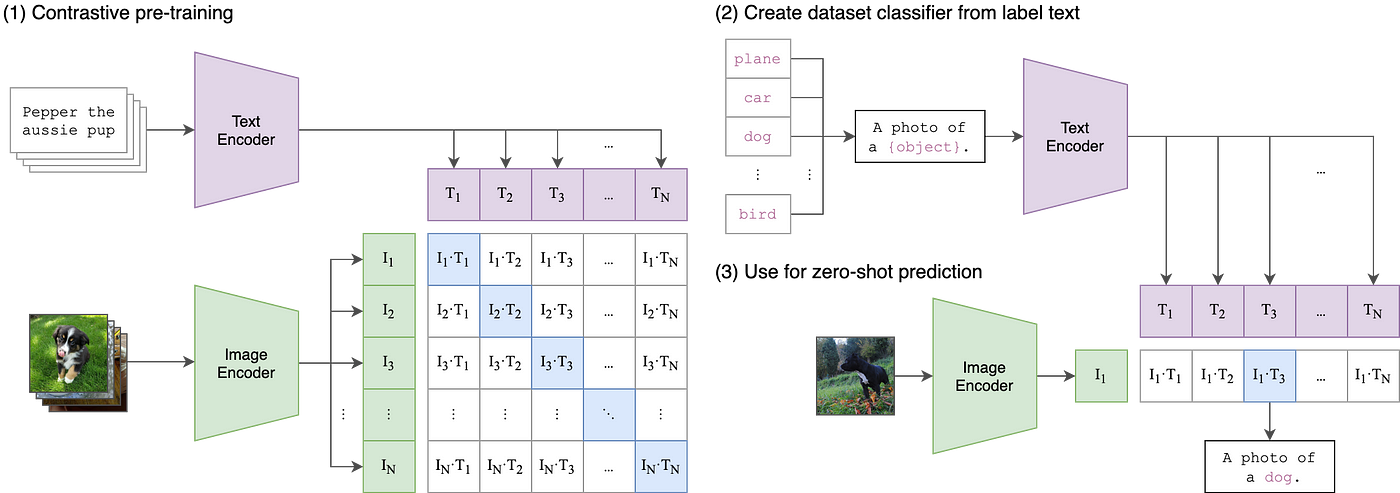
One remarkable model that leverages embedding is OpenAI’s CLIP (Contrastive Language–Image Pre-training) model. CLIP is ingeniously designed to understand and relate information across text and image modalities. It learns to map both text descriptions and images into a shared embedding space during the training process. This is achieved by training the model on a vast number of image-text pairs, where it learns to predict which text descriptions correspond to which images. Through this process, CLIP develops a rich understanding of both textual and visual information.
The real magic unfolds in how CLIP interconnects the realms of text and images. When you provide a textual query to CLIP, it projects this text into the shared embedding space. Similarly, images are also mapped to this shared space. By doing this, CLIP can measure the similarity between text and images, making it possible to, for instance, find images that match a text description or vice versa. The shared embedding space acts as a bridge, allowing text and image data to be compared and analyzed in relation to one another, which opens up a plethora of applications in multimodal learning and search systems.
Vector Database & Multimodal Search
A vector database like Epsilla is a specialized storage and computation system designed to handle vector representations of data efficiently. Unlike traditional databases that deal with discrete values, vector databases are optimized for handling continuous vector spaces.
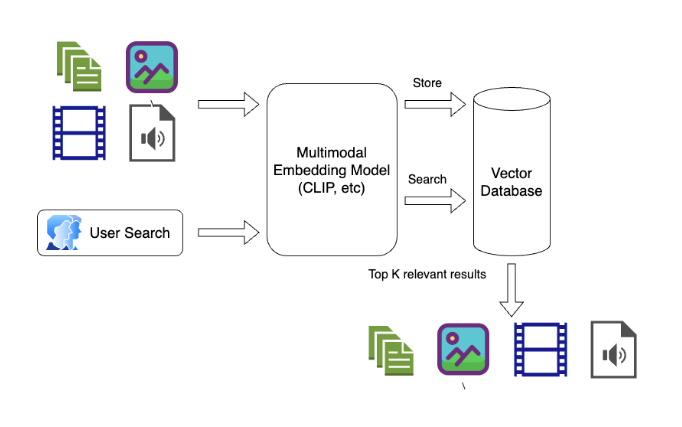
In the context of multimodal search, a vector database plays a crucial role. Multimodal search involves querying and retrieving information across different types of data (e.g., text, images, videos) by understanding the semantic relationships between them. This is often achieved by embedding the different modalities into a shared vector space using embedding models like CLIP, where semantic similarities translate to geometric closeness. The vector database houses these embeddings and enables rapid similarity searches within this shared space. When a query is issued, regardless of its modality, it’s transformed into a vector and the database is queried for other vectors that are nearby in the vector space, each representing items from potentially different modalities. This setup allows for a seamless and coherent search experience across a rich and diverse set of data, making multimodal search a powerful tool for harnessing the collective information present in various forms of data.
Building A Video Search App Using Epsilla + Streamlit
Now let’s build the video search app we showed above. (The open-source code of this project is at https://github.com/epsilla-cloud/app-gallery/tree/main/video-search)
First, create a folder structure of the project like this:
- video-search/ |-- screenshots/ |-- videos/ |-- process_video.py |-- app.py
Then, install the required python libraries (preferred within a python virtual environment)
- pip3 install pyepsilla pip3 install transformers pip3 install opencv-python pip3 install cv2 pip3 install torch pip3 install streamlit openai clip
And install and run Epsilla vector database:
- docker pull epsilla/vectordb docker run --pull=always -d -p 8888:8888 epsilla/vectordb
Now, let’s proceed to download the videos that will form our search dataset. For this purpose, we’ll be utilizing the ClipShots dataset (feel free to bring your own video dataset). Follow the instruction to download the dataset from Google Drive (ClipShots-a), rename it as data.tar.gz, decompress it, and move the 500 mp4 files under ClipShots/videos/test/ folder into video-search/videos/ folder we just created.

A video is essentially a sequence of frames, where each frame is a static image captured at a specific moment in time. To manage and search through a large dataset of videos, we adopt a sampling strategy where we extract one frame from every 20 seconds of each video. These sampled frames are then embedded using CLIP, then stored in Epsilla vector database. Later, when we have a particular query or question, we can search through these embeddings in Epsilla to find the most relevant frames and, by extension, videos.
Preprocessing the videos
Here is the code in process_video.py:
- import torch from PIL import Image import cv2 from transformers import AutoProcessor, CLIPModel from pyepsilla import vectordb import glob client = vectordb.Client() client.load_db(db_name="VideoDB", db_path="/tmp/video-search") client.use_db(db_name="VideoDB") device = "cuda" if torch.cuda.is_available() else "cpu" model = CLIPModel.from_pretrained("openai/clip-vit-base-patch32").to(device) processor = AutoProcessor.from_pretrained("openai/clip-vit-base-patch32") def encode_frame(frame): image = Image.fromarray(cv2.cvtColor(frame, cv2.COLOR_BGR2RGB)) image_input = processor(images=image, return_tensors="pt", padding=True).to(device) image_features = model.get_image_features(**image_input) return image_features.cpu().detach().numpy() def extract_frames(video_name, interval=20): video_path = './videos/' + video_name cap = cv2.VideoCapture(video_path) origin_frame_rate = cap.get(5) frame_rate = round(origin_frame_rate) while cap.isOpened(): frame_id = round(cap.get(1)) ret, frame = cap.read() if not ret: break if frame_id % (frame_rate * interval) == 0: # Save the frame into screenshot folder cv2.imwrite('./screenshots/' + video_name + '_' + str(frame_id) + '.jpg', frame) # Save the frame to the database print(client.insert( table_name="VideoData", records=[ { "Name": video_name, "FrameIndex": frame_id, "FrameRate": origin_frame_rate, "Embedding": encode_frame(frame)[0].tolist() } ] )) cap.release() def create_vdb_schema(): client.create_table( table_name="VideoData", table_fields=[ {"name": "Name", "dataType": "STRING"}, {"name": "FrameIndex", "dataType": "INT"}, {"name": "FrameRate", "dataType": "DOUBLE"}, {"name": "Embedding", "dataType": "VECTOR_FLOAT", "dimensions": 512, "metricType": "COSINE"} ] ) if __name__ == "__main__": create_vdb_schema() mp4_files = glob.glob('./videos/*.mp4') for mp4_file in mp4_files: video_path = mp4_file.rsplit('/', 1)[-1] print ('Processing', video_path) extract_frames(video_path)
Let’s explain the code piece by piece.
1. We are creating an Epsilla vector database with one table VideoData. It contains 4fields to store the name of the video, the index of the sampled frame, the frame rate (how many frames are captured within 1 second in the video), and the embeding result (CLIP model preduces 512 dimension vectors). Note that we need to use Cosine metric type as it performs much better than the default Euclidean metric for multimodal semantic similarity search.
- ... client = vectordb.Client() client.load_db(db_name="VideoDB", db_path="/tmp/video-search") client.use_db(db_name="VideoDB") ... def create_vdb_schema(): client.create_table( table_name="VideoData", table_fields=[ {"name": "Name", "dataType": "STRING"}, {"name": "FrameIndex", "dataType": "INT"}, {"name": "FrameRate", "dataType": "DOUBLE"}, {"name": "Embedding", "dataType": "VECTOR_FLOAT", "dimensions": 512, "metricType": "COSINE"} ] ) ... if __name__ == "__main__": create_vdb_schema() ...
2. For a given frame of a video (an image), we use CLIP model image encoder to embed it into a 512 dimension vector.
- ... device = "cuda" if torch.cuda.is_available() else "cpu" model = CLIPModel.from_pretrained("openai/clip-vit-base-patch32").to(device) processor = AutoProcessor.from_pretrained("openai/clip-vit-base-patch32") def encode_frame(frame): image = Image.fromarray(cv2.cvtColor(frame, cv2.COLOR_BGR2RGB)) image_input = processor(images=image, return_tensors="pt", padding=True).to(device) image_features = model.get_image_features(**image_input) return image_features.cpu().detach().numpy() ...
3. Now we loop through all the video files under video-search/videos/ folder, get the frame rate, and loop through all the frames. For every 20 seconds, we sample one frame, save the frame as an image under video-search/screenshots/ folder, embed the frame into a vector, and insert into Epsilla vector database.
- ... def extract_frames(video_name, interval=20): video_path = './videos/' + video_name cap = cv2.VideoCapture(video_path) origin_frame_rate = cap.get(5) frame_rate = round(origin_frame_rate) while cap.isOpened(): frame_id = round(cap.get(1)) ret, frame = cap.read() if not ret: break if frame_id % (frame_rate * interval) == 0: # Save the frame into screenshot folder cv2.imwrite('./screenshots/' + video_name + '_' + str(frame_id) + '.jpg', frame) # Save the frame to the database print(client.insert( table_name="VideoData", records=[ { "Name": video_name, "FrameIndex": frame_id, "FrameRate": origin_frame_rate, "Embedding": encode_frame(frame)[0].tolist() } ] )) cap.release() ... if __name__ == "__main__": ... mp4_files = glob.glob('./videos/*.mp4') for mp4_file in mp4_files: video_path = mp4_file.rsplit('/', 1)[-1] print ('Processing', video_path) extract_frames(video_path)
Now let’s run the code to process the videos
- python3 process_video.py
Create the app
Here is the code in app.py:
- import streamlit as st import torch from PIL import Image from transformers import AutoProcessor, CLIPModel from pyepsilla import vectordb device = "cuda" if torch.cuda.is_available() else "cpu" model = CLIPModel.from_pretrained("openai/clip-vit-base-patch32").to(device) processor = AutoProcessor.from_pretrained("openai/clip-vit-base-patch32") # Connect to the same Epsilla vector database where we stored the video embeddings client = vectordb.Client() client.load_db(db_name="VideoDB", db_path="/tmp/video-search") client.use_db(db_name="VideoDB") st.title("Video Search App") # Text input user_input_placeholder = st.empty() user_input = user_input_placeholder.text_input( "Describe the content you're looking for:", key="user_input" ) # Image input uploaded_file_placeholder = st.empty() uploaded_file = uploaded_file_placeholder.file_uploader( "Or upload an image:", type=["jpg", "jpeg", "png"], key="uploaded_file" ) if uploaded_file is not None: image = Image.open(uploaded_file) image_input = processor(images=image, return_tensors="pt", padding=True).to(device) # Search action trigger if st.button("Search"): if user_input: text_input = processor(text=user_input, return_tensors="pt", padding=True).to( device ) features = model.get_text_features(**text_input) elif uploaded_file is not None: features = model.get_image_features(**image_input) frobenius_norm = torch.norm(features, p="fro") normalized_tensor = features / frobenius_norm # Search Epsilla to get the top 30 most relevant frames status_code, response = client.query( table_name="VideoData", query_field="Embedding", response_fields=["Name", "FrameIndex", "FrameRate"], query_vector=normalized_tensor[0].tolist(), limit=30, with_distance=True, ) # Group the frames back based on their associated videos video_screenshots = {} for item in response["result"]: if item["@distance"] == 0: break video_name = item["Name"] if video_name not in video_screenshots: video_screenshots[video_name] = [] video_screenshots[video_name].append(item) # Show the result for video_name, items in video_screenshots.items(): st.video("./videos/" + video_name) # Display the video for i in range(0, len(items), 3): # Step by 3 for 3 columns cols = st.columns(3) # Create 3 columns for j, col in enumerate(cols): if i + j < len(items): item = items[i + j] frame_rate = item["FrameRate"] frame_index = item["FrameIndex"] # Calculate the time in seconds, then convert to minutes:seconds format time_seconds = frame_index / frame_rate minutes, seconds = divmod(time_seconds, 60) caption = f"{int(minutes):02d}:{int(seconds):02d}" # Assume get_screenshot is a function that returns an image of the given frame screenshot = ( "./screenshots/" + video_name + "_" + str(frame_index) + ".jpg" ) col.image( screenshot, caption=caption ) # Display the screenshot with caption
Most of the logic are declarative based on the app layout (thanks to Streamlit’s super powerful web app building capability). We only need to explain two parts here:
Based on user’s text or image input, we embed it into vector of same 512 dimension vector space using CLIP:
- ... if user_input: text_input = processor(text=user_input, return_tensors="pt", padding=True).to( device ) features = model.get_text_features(**text_input) elif uploaded_file is not None: features = model.get_image_features(**image_input) frobenius_norm = torch.norm(features, p="fro") normalized_tensor = features / frobenius_norm ...
2. Here we search Epsilla and get the top 30 most relevant frames from all the videos.
- ... # Search Epsilla to get the top 30 most relevant frames status_code, response = client.query( table_name="VideoData", query_field="Embedding", response_fields=["Name", "FrameIndex", "FrameRate"], query_vector=normalized_tensor[0].tolist(), limit=30, with_distance=True, ) ...
Great! Now let’s start the video search app:
- streamlit run app.py
Conclusion
Multimodal search through the utilization of vector databases like Epsilla and embedding technologies unveils a powerful avenue for navigating vast datasets. As we continue to refine and expand on these methodologies, the horizon of what’s achievable in data search and analysis broadens, opening doors to new insights and capabilities in handling unstructured data that was not possible in the past.