
Build A ChatBot That Runs Purely On Your Local Machine (Using Llama 2 + Epsilla + LangChain + Streamlit)

Since late 2022, ChatGPT has gained significant attention, capturing the interest of people across the globe. The technology behind it, Large Language Models (LLMs), represents a new wave in AI technology. This advancement has created exciting opportunities, especially for developers working on chatbots, personal assistants, and content creation. The features that LLMs introduce have ignited enthusiasm in the Developer, AI, and NLP communities.
However, LLMs come with a limitation — they are pre-trained with publicly available information from the internet and do not have access to private data. This is where the Retrieval Augmented Generation (RAG) architecture comes into play, using a vector database to supplement LLMs with relevant pieces of private data (example here).
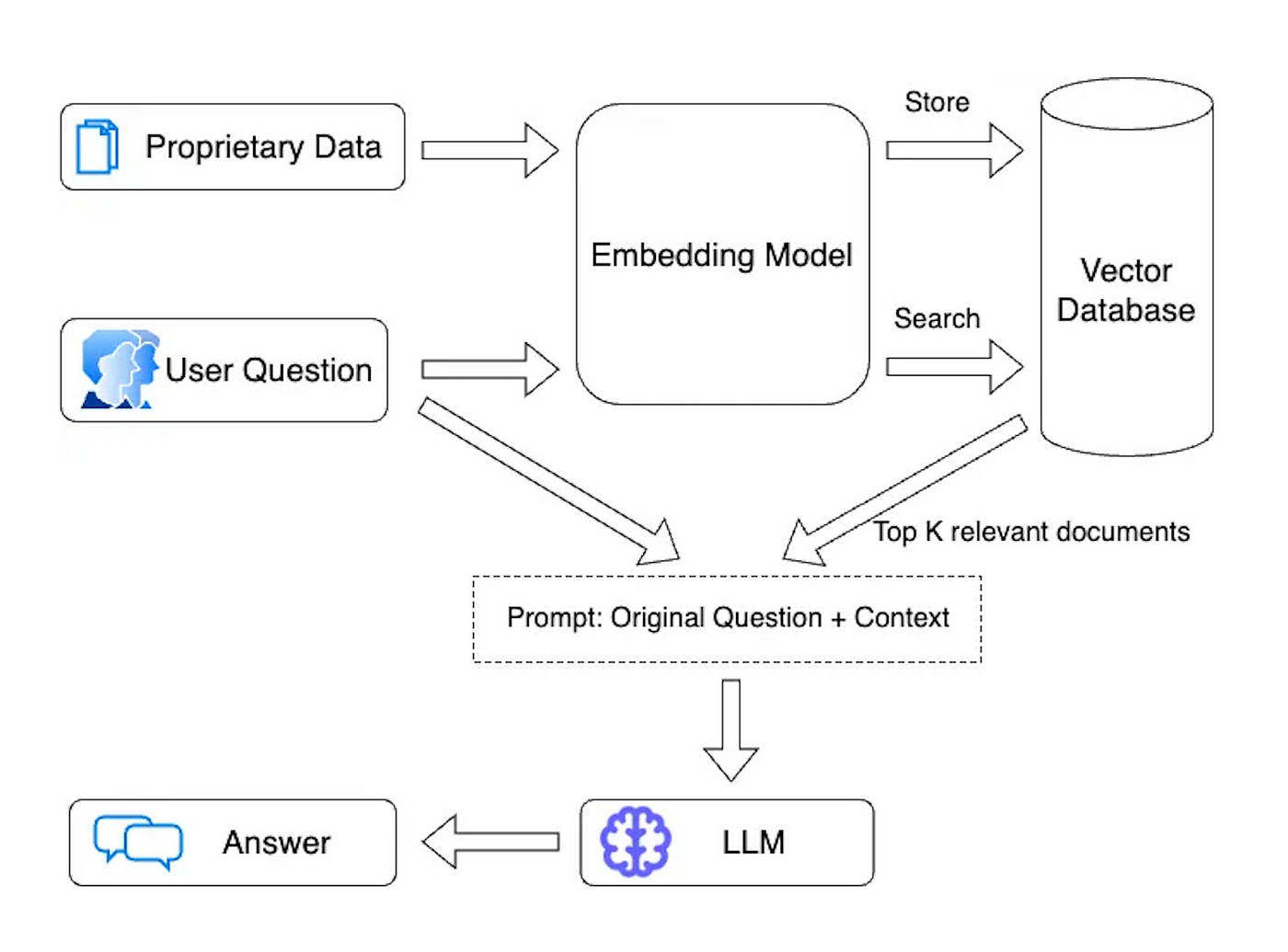
Yet, a significant concern for enterprises is the security of public hosted LLMs, such as OpenAI, where sensitive information could potentially be used for model training, and might be leaked to prompt hackers. The fear is real: imagine a scenario where a prompt hacker manipulates ChatGPT to extract your bank account password or Social Security Number! This security concern has underscored the need for a completely locally host-able RAG Chatbot that can be utilized by enterprises, ensuring the security of sensitive data while still benefiting from the advancements in conversational AI technology.
The dream of having a completely locally-hosted ChatBot has now come within grasp, thanks to the relentless and rapid advancements in the open source community. We now have at our disposal a full stack of open source tools that make this endeavor achievable: the open source foundational model Llama 2, the open source vector database Epsilla, the open source AI application orchestration framework LangChain, and the open source web application framework Streamlit. These tools, when wielded together, provide a powerful toolkit for developers to build a fully locally-hosted ChatBot embedded with proprietary knowledge. And the beauty of it lies in the speed and ease of this process; what would have perhaps taken a significant amount of time and resources in the past, can now be accomplished within a matter of hours. This not only accelerates the development cycle but also opens up a vista of opportunities for enterprises to securely harness the power of conversational AI, without the lingering concerns of data privacy and security.
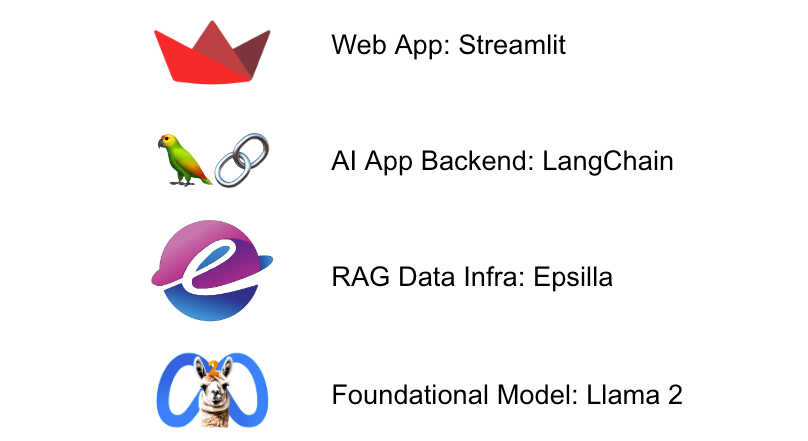
We will show you how to build this out step-by-step.
Install Llama 2 Model On Your Local Machine
LLM provides a straightforward method for downloading and utilizing open source LLMs directly on your personal computer.
- brew install llm llm install llm-gpt4all
And take a look at what models are available to use:
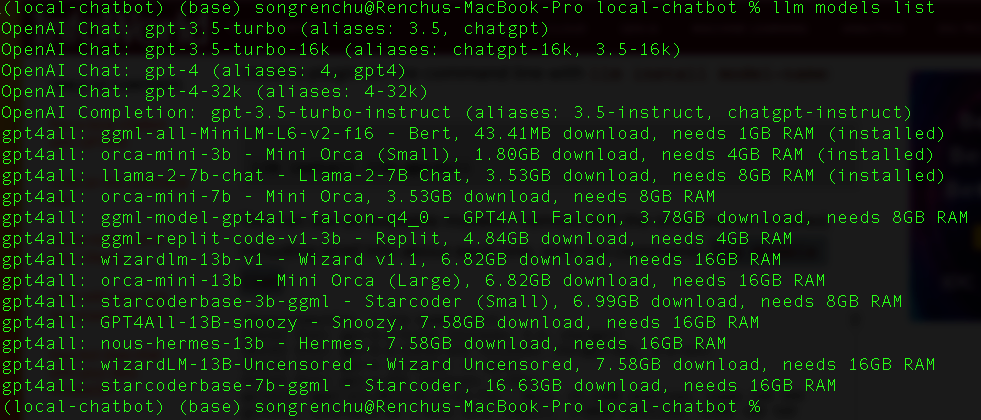
Now let’s run a query to the local llama-2–7b-chat model (the tool will download the model automatically the first time querying against it)
- llm -m llama-2-7b-chat "What is Large Language Model?" Hello! I'm here to help you with any questions you may have. A "Large Language Model" (LLM) refers to a type of artificial intelligence (AI) model that is trained on a large dataset of text, such as books, articles, or other sources of written content. The goal of an LLM is to learn the patterns and structures of language, allowing it to generate coherent and contextually appropriate text, answer questions, or even create new text based on a given prompt. LLMs are typically trained using deep learning techniques, such as recurrent neural networks (RNNs) or transformers, which allow them to learn from large amounts of data. The training process involves feeding the model a wide range of texts and adjusting the model's parameters to minimize errors in predicting the next word or character in a sequence. LLMs have many potential applications, such as: 1. Language Translation: LLMs can be trained on multiple languages to translate text from one language to another. 2. Text Summarization: LLMs can summarize long pieces of text into shorter, more digestible versions while preserving the main ideas and concepts. 3. Chatbots: LLMs can be used to create chatbots that can engage in conversation with users, answering questions or providing information on a particular topic. 4. Content Generation: LLMs can generate new content, such as articles, stories, or even entire books, based on a given prompt or topic. 5. Language Understanding: LLMs can be trained to understand natural language and detect things like sentiment, tone, and context, which can be used for various applications such as sentiment analysis or text classification.
Install Epsilla Vector Database
Run these 2 commands to install the Epsilla vector database docker image on your personal computer:
- docker pull epsilla/vectordb docker run --pull=always -d -p 8888:8888 epsilla/vectordb
Create The Project And Install Python Libraries
Now let’s create the project folder. We will use a documents folder to store knowledge files that we will let the ChatBot learn.
- mkdir local-chatbot cd local-chatbot mkdir documents
Now let’s install the required Python libraries. LangChain and Streamlit are mentioned above. pyepsilla is the Python client for Epsilla. We install sentence_transformers for locally embed the documents instead of relying on OpenAI embedding (we want everything to run locally).
- pip install langchain pip install pyepsilla pip install sentence_transformers pip install streamlit
Learn The Knowledge
Now let’s teach the ChatBot some knowledge. I came cross this Youtube video where YC managing partner Michael Seibel gave a talk on this year’s SaaStr conference about “How to Pitch Your Seed Stage Startup". Let’s teach the ChatBot about the video. We downloaded the transcript of the video, organized it using ChatGPT, it is available here.
Let’s put the file under documents folder we just created, and run this python script named learn.py to split the document, embed the chunks, and store them into Epsilla.
- from langchain.document_loaders import TextLoader from langchain.text_splitter import CharacterTextSplitter from langchain.vectorstores import Epsilla from pyepsilla import vectordb from sentence_transformers import SentenceTransformer from typing import List from glob import glob # Local embedding model model = SentenceTransformer('all-MiniLM-L6-v2') # Get list of all files in "./documents/" files = glob("./documents/*") class LocalEmbeddings(): def embed_documents(self, texts: List[str]) -> List[List[float]]: return model.encode(texts).tolist() embeddings = LocalEmbeddings() for file in files: loader = TextLoader(file) documents = loader.load() splitted_documents = CharacterTextSplitter(separator='\n', chunk_size=1000, chunk_overlap=200).split_documents(documents) client = vectordb.Client() vector_store = Epsilla.from_documents( splitted_documents, embeddings, client, db_path="/tmp/localchatdb", db_name="LocalChatDB", collection_name="LocalChatCollection" )
- python learn.py
Build The ChatBot
Now let’s build the ChatBot Web App! Here is the app.py
- from langchain.vectorstores import Epsilla from pyepsilla import vectordb from sentence_transformers import SentenceTransformer import streamlit as st import subprocess from typing import List # Local embedding model for embedding the question. model = SentenceTransformer('all-MiniLM-L6-v2') class LocalEmbeddings(): def embed_query(self, text: str) -> List[float]: return model.encode(text).tolist() embeddings = LocalEmbeddings() # Connect to Epsilla as knowledge base. client = vectordb.Client() vector_store = Epsilla( client, embeddings, db_path="/tmp/localchatdb", db_name="LocalChatDB" ) vector_store.use_collection("LocalChatCollection") # The 1st welcome message st.title("💬 Chatbot") if "messages" not in st.session_state: st.session_state["messages"] = [{"role": "assistant", "content": "How can I help you?"}] # A fixture of chat history for msg in st.session_state.messages: st.chat_message(msg["role"]).write(msg["content"]) # Answer user question upon receiving if question := st.chat_input(): st.session_state.messages.append({"role": "user", "content": question}) context = '\n'.join(map(lambda doc: doc.page_content, vector_store.similarity_search(question, k = 5))) st.chat_message("user").write(question) # Here we use prompt engineering to ingest the most relevant pieces of chunks from knowledge into the prompt. prompt = f''' Answer the Question based on the given Context. Try to understand the Context and rephrase them. Please don't make things up or say things not mentioned in the Context. Ask for more information when needed. Context: {context} Question: {question} Answer: ''' print(prompt) # Call the local LLM and wait for the generation to finish. This is just a quick demo and we can improve it # with better ways in the future. command = ['llm', '-m', 'llama-2-7b-chat', prompt] process = subprocess.Popen(command, stdout=subprocess.PIPE, stderr=subprocess.PIPE, text=True) content = '' while True: output = process.stdout.readline() if output: content = content + output return_code = process.poll() if return_code is not None: break # Append the response msg = { 'role': 'assistant', 'content': content } st.session_state.messages.append(msg) st.chat_message("assistant").write(msg['content'])
The Final Result
Great! Now let’s start the ChatBot:
- streamlit run app.py
And you can now chat with your own ChatBot running locally on your machine.
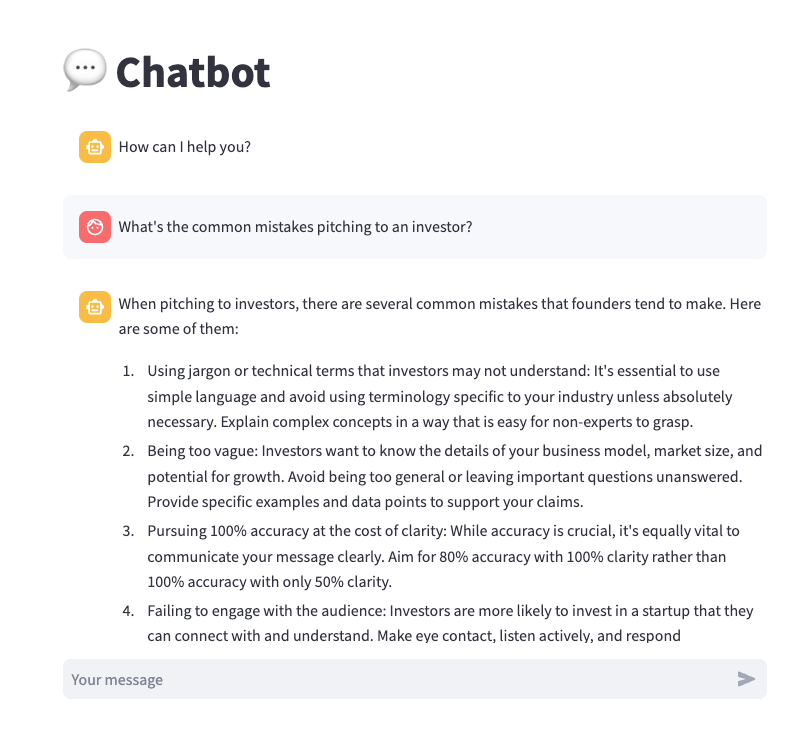
You can confidently input sensitive information into the ChatBot and pose your questions without concerns about data leaks. Furthermore, you have complete control over the infrastructure, eliminating the need to worry about API rate limits, and, most importantly, token costs.
Conclusion
In an era of rapidly evolving AI technology, the ability to run a fully locally-hosted ChatBot is a game-changer. You can confidently interact with your ChatBot, knowing that your data is secure, infrastructure is under your control, and token costs are eliminated. Explore the open-source code of this project at https://github.com/epsilla-cloud/app-gallery/tree/main/local-chatbot, and embark on your journey to leverage the power of conversational AI on your terms.